
Local LLMs: Where to Actually Start, with Vincent Deeney (A Chat with Cross-Functional Experts)
If you’re an engineer or quality professional wondering how to actually start using AI beyond the chatbots and CAD plugins your company already provides, this episode is your starting point.
Vincent Deeney (technologist and AI enthusiast) joins Dianna to break down how to run large language models (LLMs) on your own hardware, why that matters for data privacy, and how to get real work done with modest equipment. No programming required.
This interview is part of our series, “A Chat with Cross Functional Experts”.
About Vincent
Vincent Deeney is a director who has spent the past five years helping organizations navigate complex software decisions. Before that, he built a nearly two-decade career specializing in data quality, master data management, and governance. He holds a Master’s in Organization Leadership and, perhaps most tellingly, an undergraduate degree in Philosophy. He’s someone who asks the right questions before reaching for a solution. Lately he’s been exploring local LLMs on his own time.
What Vincent and Dianna Talk About
They walked through the practical side of running local LLMs.
We covered why data privacy and token costs push people toward local setups, what hardware you actually need (from your existing laptop to a dedicated AI machine like the DGX Spark), and which free tools — Ollama, LM Studio, OpenCode, Hermes Agent — make it possible to get started without writing code. We dug into how local models compare to frontier models like Claude, and Vincent shared his approach to using both together: plan with the frontier model, execute with the local one.
We also talked about managing context windows, using sub-agents, and connecting local models to tools you’re already using. The episode wraps with a practical challenge to get you started this week.
Key Takeaways:
Your Data Stays on Your Machine
One of the biggest advantages of running a local LLM is data privacy. In regulated industries — medical devices, energy, any environment handling customer PII (personally identifiable information) — sending proprietary information to a cloud-based AI provider carries real legal and compliance risk. A local model eliminates that concern entirely. Your prompts, your data, and your results never leave your hardware. For engineers who’ve been blocked from using AI by company policy, this is often the unlock.
You Don’t Need Expensive Hardware to Start
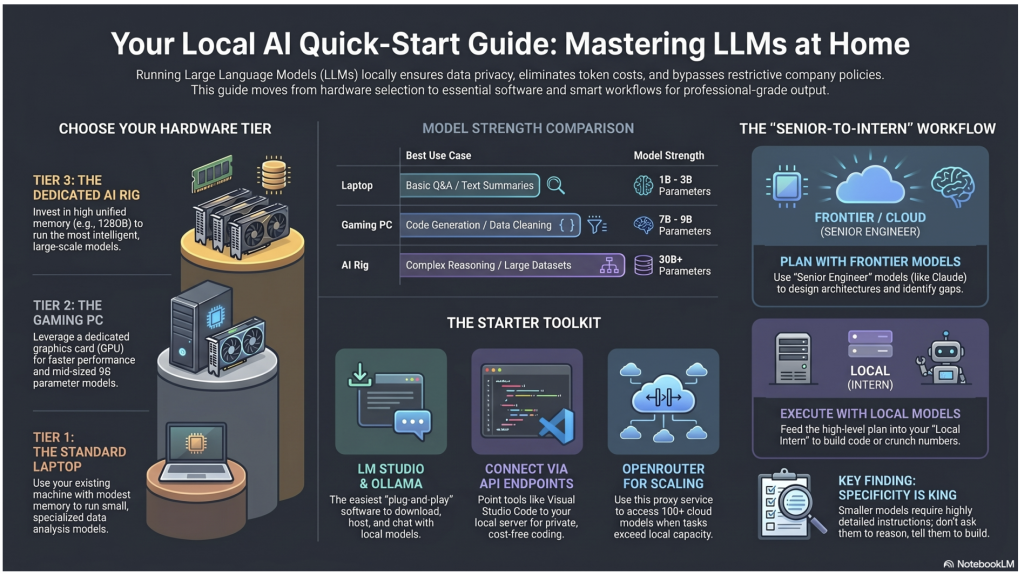
Vincent runs local models across three tiers: a standard laptop, a gaming PC, and a dedicated AI machine. But the entry point is lower than most people think. If your computer has a reasonable amount of memory, you can install Ollama or LM Studio and download a small model that handles data analysis, code generation, and general Q&A. It won’t match a frontier model, but it runs, it’s private, and it’s free after the initial setup. Gaming PCs with decent graphics cards hit a sweet spot of speed and capability. And for those ready to invest, machines like NVIDIA’s DGX Spark can run much larger, more capable models at home.
Use Frontier Models to Plan, Local Models to Execute
This was one of the most actionable ideas in the conversation. Rather than asking a small local model to reason through a complex problem from scratch, use a frontier model like Claude to collaborate on the concept — define the architecture, identify gaps, choose the right analytical approach. Then take that well-defined plan and hand it to your local model for execution: building the Python script, running the statistical analysis, processing the data. The frontier model is the senior engineer; the local model is the intern who crunches the numbers. This multi-model workflow gets you the best of both worlds while keeping costs and data exposure under control.
Smaller Models Need Better Instructions
Frontier models are trained on enough data to interpret vague requests and fill in the blanks. Local models, especially at the smaller end, are more sensitive to how you frame your prompts. The specificity of your instructions matters more as model size decreases. Vincent’s advice: don’t ask a small model to do the reasoning — tell it exactly what to build. Instead of asking it to perform a statistical analysis, describe the data structure and tell it to write Python code that runs the analysis. The model is well-trained on code generation even at small sizes; it’s the open-ended reasoning where it falls short.
Local Models Connect to Your Existing Tools
Running a local model doesn’t mean working in isolation. Tools like LM Studio expose API endpoints that other software can connect to. If you use Visual Studio, for example, you can install a plugin and point it to your local model instead of a cloud AI provider. The coding assistance runs locally, privately, at no per-token cost. Many applications are being built with flexible endpoints specifically because the AI provider landscape is so varied — which means your local setup can often plug right in.
Token Costs Add Up — Local and Tiered Models Help
If you’re doing serious work with a frontier model, you’ll hit usage limits quickly, sometimes within an hour. Every interaction costs tokens, and longer conversations cost more as the context window grows. Local models eliminate ongoing token costs entirely. For tasks that exceed your local model’s capability but don’t require a top-tier model, services like OpenRouter let you access over a hundred models at varying price points. Vincent’s workflow is to start local, scale up to a mid-tier cloud model if needed, and only go to the frontier when the problem demands it. Most of the time, one frontier interaction costs as much as everything else combined.
Context Windows Matter More Than You Think
Every conversation with an LLM has a context window — the total amount of information the model holds in memory during your session. The longer the conversation, the larger the window, and with frontier models, the more expensive each interaction becomes. Eventually you hit a hard limit. Running local models makes this visible in a way cloud interfaces often hide. Strategies like context compression (summarizing the conversation to free up space) and sub-agents (spawning separate model instances for subtasks so each one has a clean, small context window) help manage this. These techniques work with frontier models too, but you learn them faster when you can see the mechanics locally.
Insight to Action
The Best Way to Learn Is to Just Start
Vincent’s parting advice: download LM Studio, grab a model that fits your hardware (the tool will recommend one), install a web search tool, and give it a task. Have it do your morning research, scan websites for updates, or summarize documents. The barrier to entry is lower than it looks, and the learning compounds quickly. Playing with these tools is how you discover use cases you wouldn’t have imagined — and how you build the intuition to know when AI helps and when it doesn’t.
Other Quality during Design podcast episodes you might like:
Keven Wang’s 4-Step Journey to AI-Powered Quality Control (A Chat with Cross-Functional Experts)
Case Study: What Engineering Really Gets from Concept Development (Service Design)



Leave a Reply